> ## Documentation Index
> Fetch the complete documentation index at: https://docs.tread.ai/llms.txt
> Use this file to discover all available pages before exploring further.
# Reporting
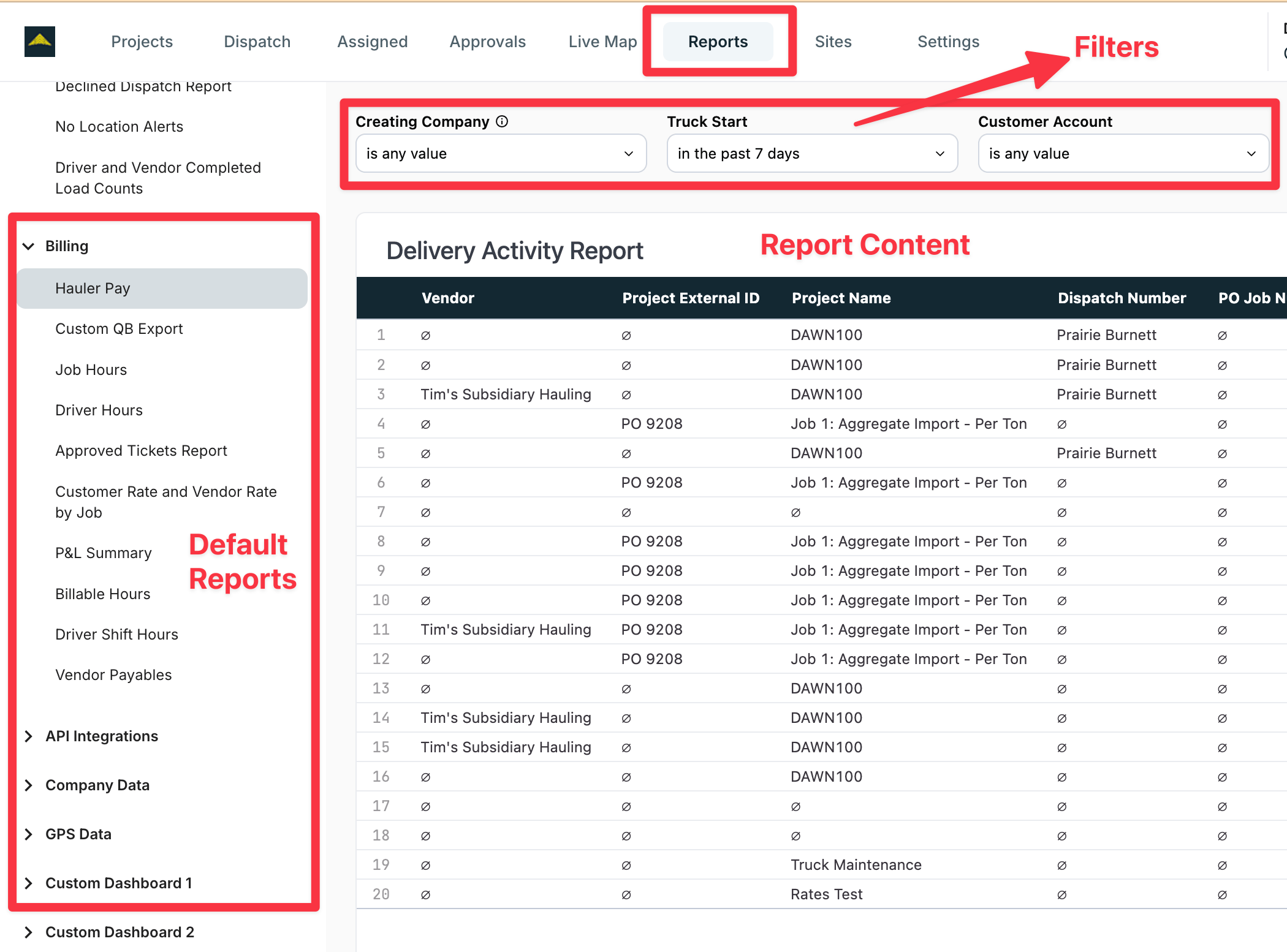
> Tread's reporting suite allow for a range basic export files, scheduled report deliveries, robust dashboards and rich visualizations.
Tread comes with more than a dozen of default reports, and custom reporting is available upon request and based on your subscription plan.
 ## What it is
Reports is Tread's custom report library. Each report renders live inside Tread, alongside the standard reports in [Exports & Reports](/workflows/exports-reports). When your team needs a report that does not exist yet, Tread configures it for your account.
## How Tread models it
* **Report** — a saved report that renders inside Tread. Tread configures reports for your account. System reports are available to every account.
* **Category** — a group of reports. The report list is organized by category.
* **Data scope** — a report shows data for your company and its [child companies](/concepts/companies-hierarchy).
* **Time zone** — a report renders in the viewing user's time zone.
## When to use Reports vs Exports
| Use [Exports & Reports](/workflows/exports-reports) when | Use OmniReports when |
| -------------------------------------------------------- | --------------------------------------- |
| The report you need is already there | The report does not exist yet |
| You need a scheduled export or an accounting push | You need a custom report, live in Tread |
## Access
**OmniReports requires report access.** Viewing reports is gated by the user's [Role](/concepts/roles-permissions). If a user cannot open OmniReports, check their Role.
## Related
* [Exports & Reports](/workflows/exports-reports) — standard reports, scheduled exports
* [Roles & Permissions](/concepts/roles-permissions) — who can view reports
* [Companies & Hierarchy](/concepts/companies-hierarchy) — the data scope for parent and child companies
## What it is
Reports is Tread's custom report library. Each report renders live inside Tread, alongside the standard reports in [Exports & Reports](/workflows/exports-reports). When your team needs a report that does not exist yet, Tread configures it for your account.
## How Tread models it
* **Report** — a saved report that renders inside Tread. Tread configures reports for your account. System reports are available to every account.
* **Category** — a group of reports. The report list is organized by category.
* **Data scope** — a report shows data for your company and its [child companies](/concepts/companies-hierarchy).
* **Time zone** — a report renders in the viewing user's time zone.
## When to use Reports vs Exports
| Use [Exports & Reports](/workflows/exports-reports) when | Use OmniReports when |
| -------------------------------------------------------- | --------------------------------------- |
| The report you need is already there | The report does not exist yet |
| You need a scheduled export or an accounting push | You need a custom report, live in Tread |
## Access
**OmniReports requires report access.** Viewing reports is gated by the user's [Role](/concepts/roles-permissions). If a user cannot open OmniReports, check their Role.
## Related
* [Exports & Reports](/workflows/exports-reports) — standard reports, scheduled exports
* [Roles & Permissions](/concepts/roles-permissions) — who can view reports
* [Companies & Hierarchy](/concepts/companies-hierarchy) — the data scope for parent and child companies