> ## Documentation Index
> Fetch the complete documentation index at: https://docs.tread.ai/llms.txt
> Use this file to discover all available pages before exploring further.
# Project Rates
> Define a pricing rulebook on a project once — Tread matches the right rate to every job.
## What this solves
When pricing varies by truck, material, or site, billers end up re-keying rates on every ticket. Project Rates ends that. You define the pricing rules once on the [Project](/concepts/orders-projects). Tread then applies the right customer, vendor, and driver rate to each order and job automatically.
Each rate holds three values:
| Value | What it is |
| ----------------- | ------------------------------------------------------------- |
| **Customer rate** | What the customer is charged |
| **Vendor rate** | What the vendor or carrier is paid |
| **Driver rate** | What your internal driver earns — can inherit the vendor rate |
Check **Use vendor rate and add-ons for driver rate** to keep the driver rate in sync with the vendor rate automatically.
## How matching works
Conditions narrow when a rate applies. There are four, combinable in any mix: **Pickup [Site](/concepts/sites-geofences)**, **Dropoff Site**, **[Equipment](/concepts/equipment) Type**, and **[Material](/concepts/materials)**. A rate with no conditions is the project-wide default.
Matching runs per job, once equipment is assigned. Change the truck, pickup, dropoff, or material and the rate re-evaluates. The pick order:
1. **Manual override** — never replaced by automatic matching.
2. **Starred rate** — forces one rate onto every job on the order.
3. **Most specific match** — three conditions beat two, two beat one.
4. **Project default** — the no-condition rate.
5. **Company rate cards** — account-specific first, then defaults.
## Walkthrough
Open a project. Rates appear as accordion rows — collapsed shows a summary with condition chips.
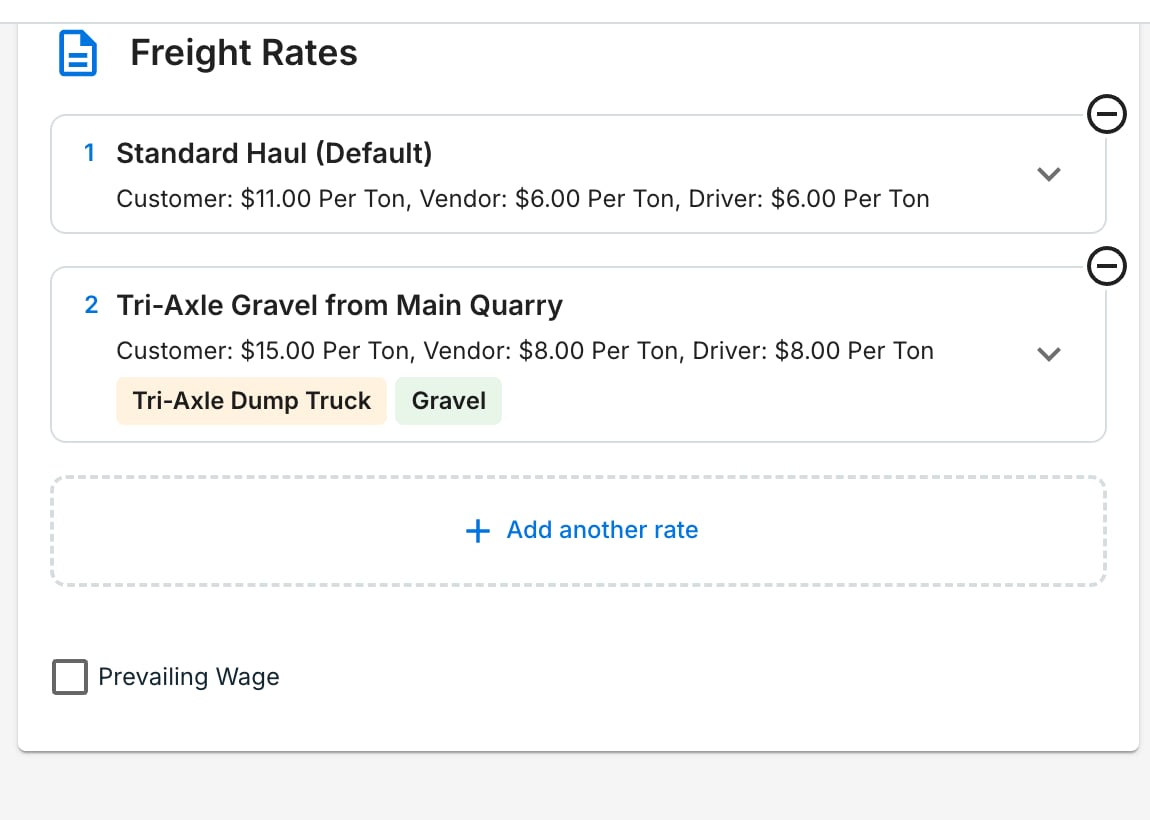 Click **Add another rate**. Name it clearly (e.g., *Tri-Axle Gravel from Main Quarry*). Enter the customer, vendor, and driver values, then add conditions. Duplicate a rate to clone and tweak. There is no limit on rate count.
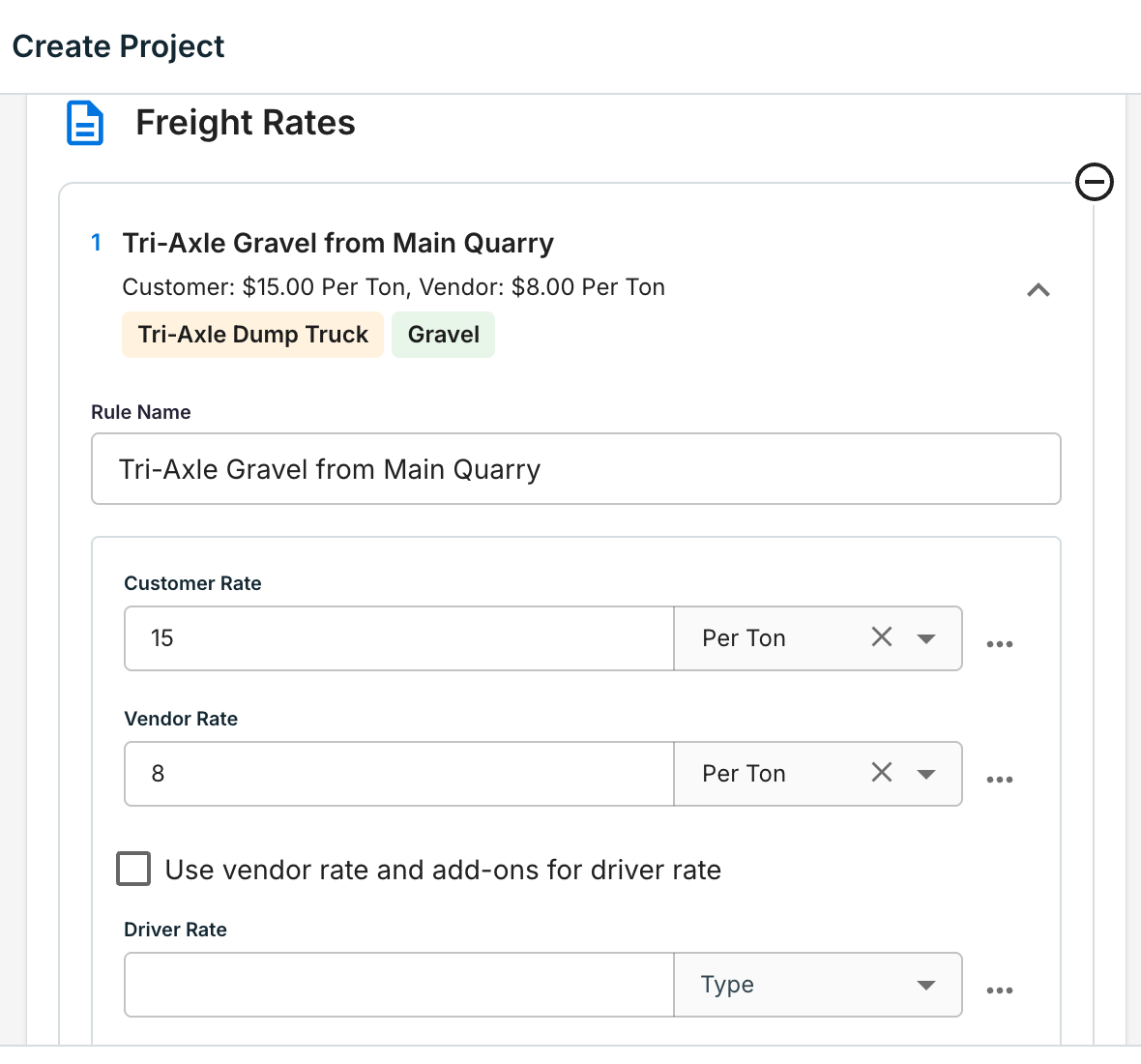 Use the **…** menu on a rate row to attach [add-ons](/concepts/rates-add-ons) (fuel surcharge, standby) or pull in an account rate card as a starting point. Update a rate card once and every project using it picks up the change.
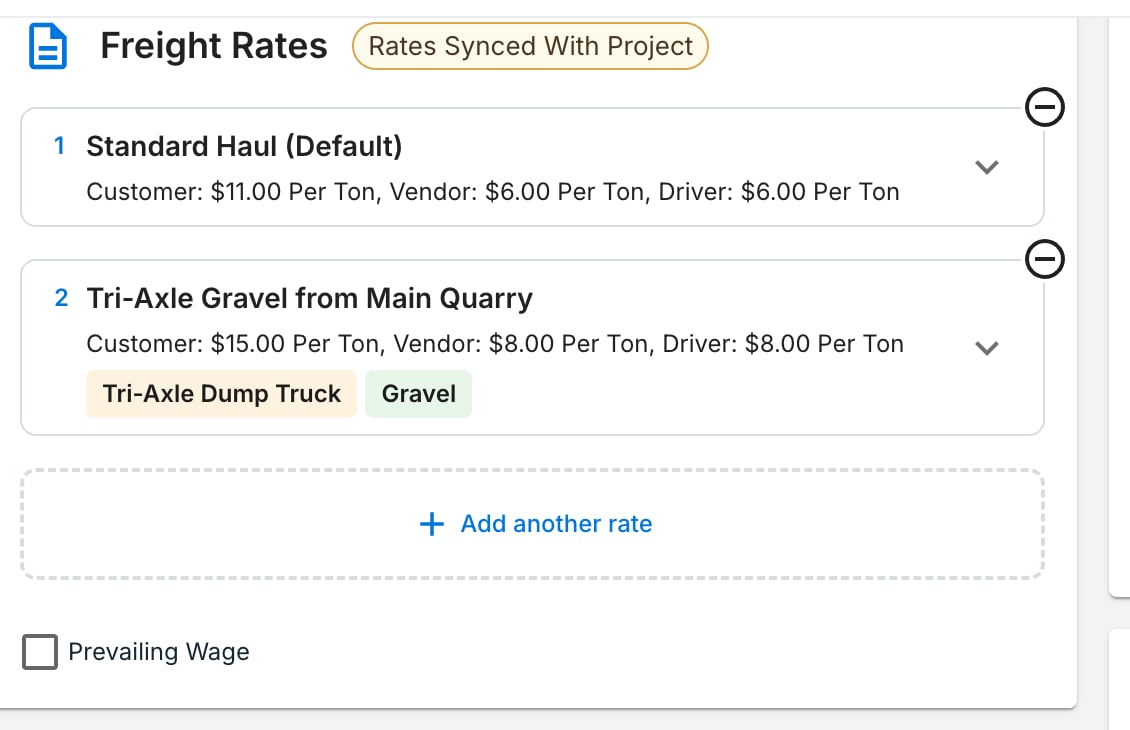
Every order form shows the project's rates. The **Rates Synced With Project** chip confirms the order reads live project rules. Star one rate to force it onto every job — useful for flat-rate hauls. Orders without a project can hold their own order-level rates.
Use the **…** menu on a rate row to attach [add-ons](/concepts/rates-add-ons) (fuel surcharge, standby) or pull in an account rate card as a starting point. Update a rate card once and every project using it picks up the change.
Every order form shows the project's rates. The **Rates Synced With Project** chip confirms the order reads live project rules. Star one rate to force it onto every job — useful for flat-rate hauls. Orders without a project can hold their own order-level rates.
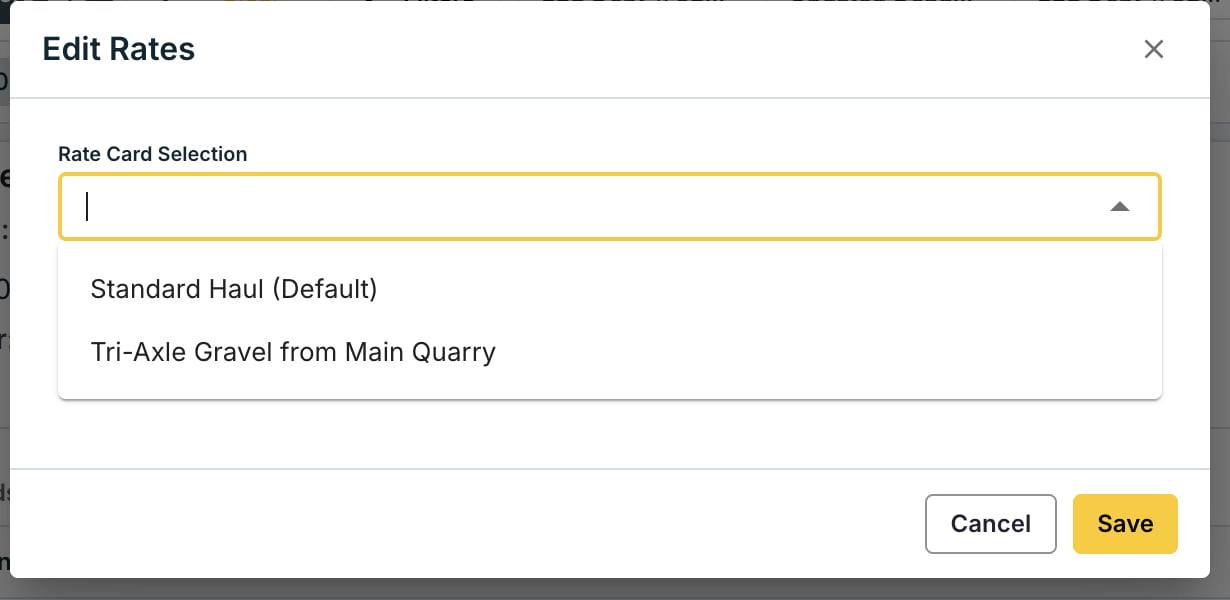
 Fix a single job from the **Edit Job** or **Edit Rate** form. The modal shows the project's rates to pick from; picking a non-matching rate flags it as manual. One click reverts to the system match. Invoice-level edits apply to that invoice only.
 ## Editing and stamping
While an order is active, rate edits sync both ways between project and order. When an order completes, its rates are **stamped** — snapshotted and disconnected — so later project edits never change finished billing.
| Edit at… | Updates… |
| ----------------- | --------------------------------- |
| Project | All open orders on that project |
| Order (active) | The project + other open orders |
| Order (completed) | That order only — already stamped |
## Rate history
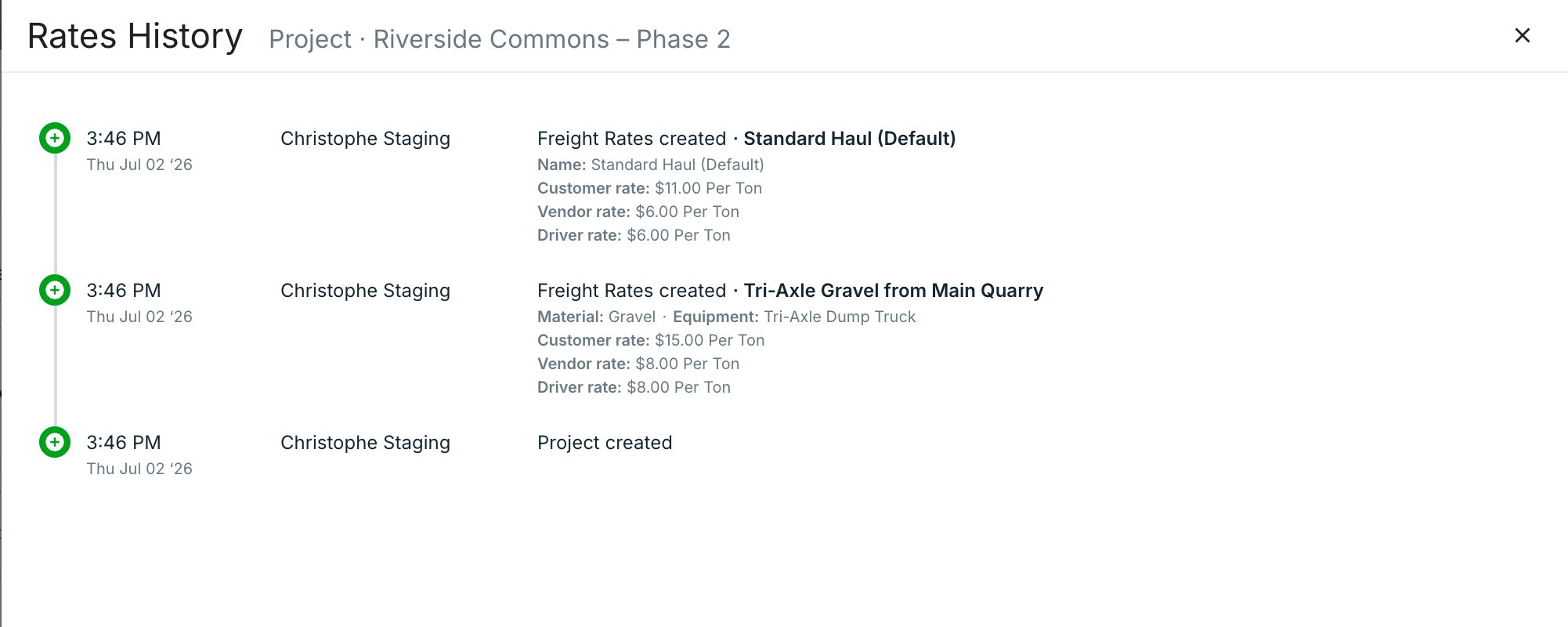
Every rate change is logged. Click **Rates History** on a project card (or in the project form header) to see a timeline: who changed what, when, and the exact values. Use it to answer "why did this rate change?" without a support ticket.
## Editing and stamping
While an order is active, rate edits sync both ways between project and order. When an order completes, its rates are **stamped** — snapshotted and disconnected — so later project edits never change finished billing.
| Edit at… | Updates… |
| ----------------- | --------------------------------- |
| Project | All open orders on that project |
| Order (active) | The project + other open orders |
| Order (completed) | That order only — already stamped |
## Rate history
Every rate change is logged. Click **Rates History** on a project card (or in the project form header) to see a timeline: who changed what, when, and the exact values. Use it to answer "why did this rate change?" without a support ticket.
 ## Migrating from Site Rates
Existing Site Rates were migrated automatically — no re-entry. They now appear as rates with a Pickup Site condition and match the same way as before. Layer in more conditions when ready.
## Watch it
{/* VIDEO: Short demo — job auto-matching by site, material, equipment · https://www.loom.com/share/43377aa535134b749a54c738a0b5cc98 */}
## Common pitfalls
**Add-ons are replaced when the matched rate changes.** A re-match clears the old rate's add-ons and applies the new rate's. To apply an add-on universally, attach it to every rate that could match.
**Two rates with identical conditions are ambiguous.** Tread warns you; the first-listed rate wins. Reorder them or change a condition to make each unique.
## FAQ
Tread falls back to your company rate cards — account-specific first, then defaults. Keep one no-condition rate on the project to guarantee a match.
Not while the order is active — edits sync both ways. After completion, rates are stamped and stop syncing. Job and invoice edits never sync back.
Completed orders hold a snapshot from when the work finished. Reopening the order keeps the stamped rates.
Rates on mobile are editable, not view-only. Drivers' visibility stays gated by [Roles & Permissions](/concepts/roles-permissions). Bulk edits from the order screen act as manual overrides.
## Related
* [Manage Rates, Add-Ons & Fees](/workflows/manage-rates) — company-level rate cards, add-ons, and fuel surcharge
* [Rates, Add-Ons & Fuel Surcharges](/concepts/rates-add-ons) — how Tread models pricing
* [Orders & Projects](/concepts/orders-projects) — how Projects, Orders, and Jobs fit together
* [Settlements & Driver Pay](/concepts/settlements-driver-pay) — where matched rates land
## Migrating from Site Rates
Existing Site Rates were migrated automatically — no re-entry. They now appear as rates with a Pickup Site condition and match the same way as before. Layer in more conditions when ready.
## Watch it
{/* VIDEO: Short demo — job auto-matching by site, material, equipment · https://www.loom.com/share/43377aa535134b749a54c738a0b5cc98 */}
## Common pitfalls
**Add-ons are replaced when the matched rate changes.** A re-match clears the old rate's add-ons and applies the new rate's. To apply an add-on universally, attach it to every rate that could match.
**Two rates with identical conditions are ambiguous.** Tread warns you; the first-listed rate wins. Reorder them or change a condition to make each unique.
## FAQ
Tread falls back to your company rate cards — account-specific first, then defaults. Keep one no-condition rate on the project to guarantee a match.
Not while the order is active — edits sync both ways. After completion, rates are stamped and stop syncing. Job and invoice edits never sync back.
Completed orders hold a snapshot from when the work finished. Reopening the order keeps the stamped rates.
Rates on mobile are editable, not view-only. Drivers' visibility stays gated by [Roles & Permissions](/concepts/roles-permissions). Bulk edits from the order screen act as manual overrides.
## Related
* [Manage Rates, Add-Ons & Fees](/workflows/manage-rates) — company-level rate cards, add-ons, and fuel surcharge
* [Rates, Add-Ons & Fuel Surcharges](/concepts/rates-add-ons) — how Tread models pricing
* [Orders & Projects](/concepts/orders-projects) — how Projects, Orders, and Jobs fit together
* [Settlements & Driver Pay](/concepts/settlements-driver-pay) — where matched rates land