

Setup
In what order should I set up master data?
In what order should I set up master data?
Flat or parent/child hierarchy?
Flat or parent/child hierarchy?
Where do I create drivers, vendors, and equipment?
Where do I create drivers, vendors, and equipment?
What's the difference between a Project and an Order?
What's the difference between a Project and an Order?
Do I need a geofence on every site?
Do I need a geofence on every site?
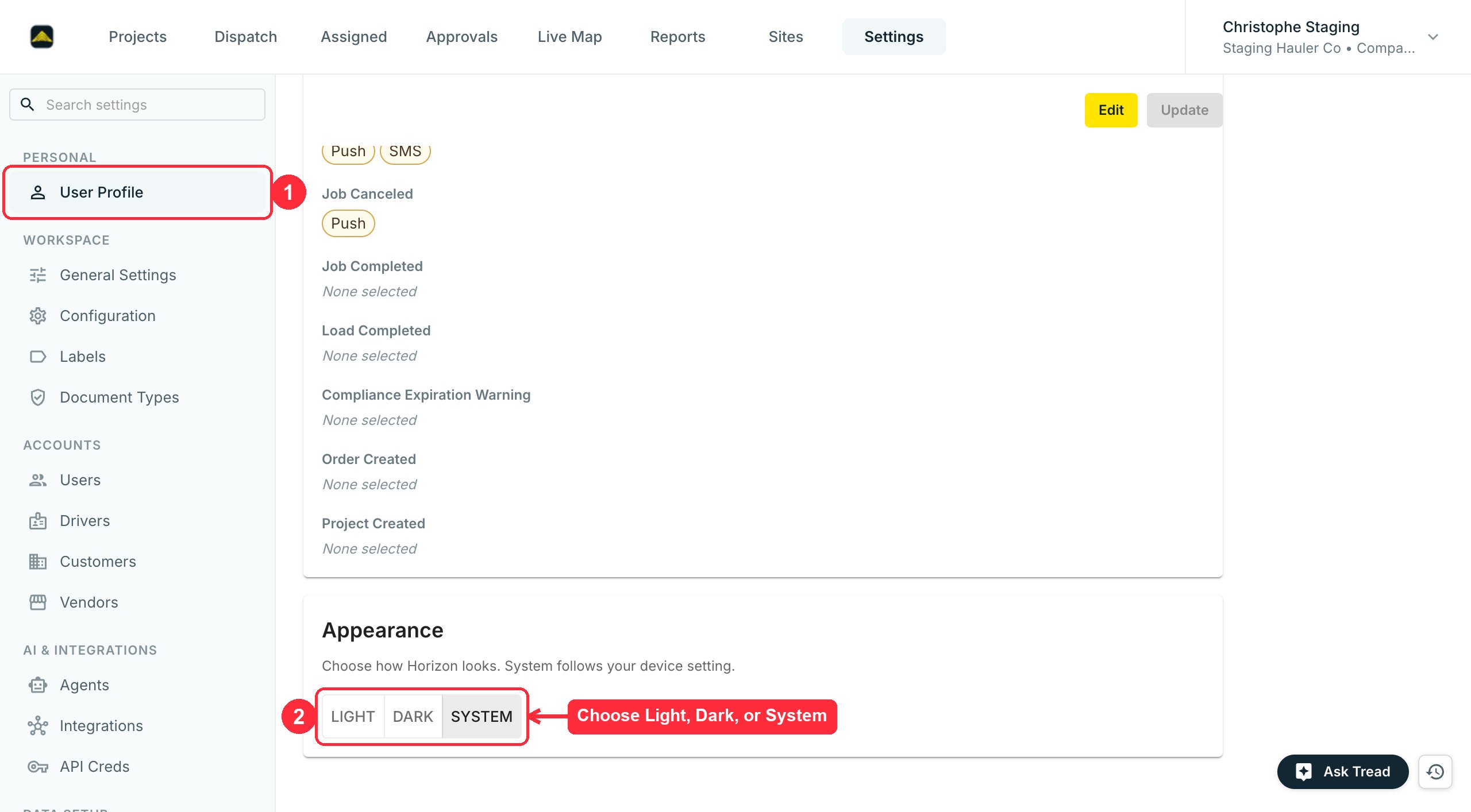
How do I change color mode (dark/light)?
How do I change color mode (dark/light)?
Job Site not showing for New Order
Job Site not showing for New Order
- The site is active. The New Order site list only shows active sites. Reactivate it under Settings → Sites.
- You’re on the right company. The list only shows sites on the company the order is under. See Companies & Hierarchy.
- The list is still loading. Sites load a page at a time as you scroll. Keep scrolling before you decide a site is missing.
Billing
When can I invoice a customer?
When can I invoice a customer?
How do I fix an approved settlement?
How do I fix an approved settlement?
I accidentally deleted a digital ticket. Can I restore it?
I accidentally deleted a digital ticket. Can I restore it?
When is a ticket considered a duplicate?
When is a ticket considered a duplicate?
- Formatting is ignored.
A-1234,a1234, andA 1234are all the same number. - The check covers your whole account, not one order or project. A number reused on another project still flags.
- Tickets with no service date are compared to each other. Two undated tickets sharing a number both flag.
- Each pair is checked separately, so a long run can chain. Tickets on day 1, day 7, and day 13 all flag, even though the first and last are 12 days apart.
How do fuel surcharges work?
How do fuel surcharges work?
- A Fuel Price Index (the weekly diesel reference)
- A Surcharge Schedule (the price-to-surcharge table).
- Add-On that applies the schedule to an order.
- Update the index weekly.
See Manage Rates, Add-Ons, Fees.
- Update the index weekly.
Can I split one job across two invoices?
Can I split one job across two invoices?
How does commission on driver pay work?
How does commission on driver pay work?
Can I export billing to my accounting system?
Can I export billing to my accounting system?
What can I edit on an order after I've dispatched or completed it?
What can I edit on an order after I've dispatched or completed it?
Drivers & Vendors
What's the difference between a vendor and an owner-operator?
What's the difference between a vendor and an owner-operator?
What's the difference between an internal and an external truck?
What's the difference between an internal and an external truck?
Can I dispatch directly to a driver on a vendor's account?
Can I dispatch directly to a driver on a vendor's account?
How do I remove a driver who left?
How do I remove a driver who left?
A driver can't sign in — can loads still move?
A driver can't sign in — can loads still move?
Can I reject a job after accepting it?
Can I reject a job after accepting it?
I accidentally ended my job. Can it be restored?
I accidentally ended my job. Can it be restored?
How long does it take vendors and drivers to adopt the app?
How long does it take vendors and drivers to adopt the app?
Can drivers see the customer billing rate?
Can drivers see the customer billing rate?
A driver I'm hiring already worked at another Tread company. How do I add them?
A driver I'm hiring already worked at another Tread company. How do I add them?
I added someone as a vendor (or owner-operator) by mistake. How do I change them to a driver?
I added someone as a vendor (or owner-operator) by mistake. How do I change them to a driver?
Contact Tread support and provide the driver details. Tread Support will be able to help reset the account so you can add the driver as a User in your account.
How do I rename a vendor or merge duplicate driver profiles?
How do I rename a vendor or merge duplicate driver profiles?
I'm adding a vendor or broker and the email is already taken. What now?
I'm adding a vendor or broker and the email is already taken. What now?
Dispatch
A ticket was logged on the wrong order. Can I move it?
A ticket was logged on the wrong order. Can I move it?
- Open the ticket on the wrong job and download the ticket image.
- In Approvals, open the correct job and add a ticket, uploading the image you saved. Confirm the ticket number appears, then close.
- Check the ticket now shows on the correct job, then remove it from the wrong job.
Integrations
Which accounting systems does Tread connect to?
Which accounting systems does Tread connect to?
Which telematics providers are supported?
Which telematics providers are supported?
Does Tread integrate with HCSS HeavyJob?
Does Tread integrate with HCSS HeavyJob?
Can I use Tread without an accounting integration?
Can I use Tread without an accounting integration?
Mobile
How does a driver log in for the first time?
How does a driver log in for the first time?
What devices does the Tread app run on?
What devices does the Tread app run on?
Does the app work without service?
Does the app work without service?
Why didn't a load auto-start?
Why didn't a load auto-start?
"Location sharing stopped, tap to resume" — what does this mean?
"Location sharing stopped, tap to resume" — what does this mean?
- The driver’s phone had no signal for an extended period — about 5 minutes or more.
- The driver denied location permission.
Can a foreman create orders from the app?
Can a foreman create orders from the app?
A driver isn't getting the verification code. What now?
A driver isn't getting the verification code. What now?
- Wait 60 seconds, then tap Resend code.
- Confirm the phone number on file matches the SIM in the phone.
- For Spanish-speaking drivers, switch the app language under Settings → Idioma.
The app says "Storage full." How do I fix it?
The app says "Storage full." How do I fix it?
- Delete apps you no longer use.
- Delete or back up old photos and videos — they usually take the most space.
- Clear app caches (Android only).
Unable to install the app on Android — "Tread app will be available for download shortly"
Unable to install the app on Android — "Tread app will be available for download shortly"
- Open the phone’s Settings app.
- Tap Apps or App Management.
- Find Google Play Store in the list.
- Tap it, then tap Enable if it shows as disabled.
Notifications
Why is everyone in my company suddenly getting dispatch or job text alerts?
Why is everyone in my company suddenly getting dispatch or job text alerts?
Notifications
How do I stop getting texts or emails I don't want?
How do I stop getting texts or emails I don't want?
Pricing
How is Tread priced?
How is Tread priced?
Do you charge per driver or per vendor?
Do you charge per driver or per vendor?
Is there a free trial?
Is there a free trial?